AKA Chris, is a software developer from Athens, Greece. He started programming with basic when he was very young. He lost interest in programming during school years but after an unsuccessful career in audio, he decided focus on what he really loves which is technology.
He loves working with older languages like C and wants to start programming electronics and microcontrollers because he wants to get into embedded systems programming.
I did a bit of everything today. I implemented some important things and designed my codebase.
Mouse Button Detection and Cursor Position
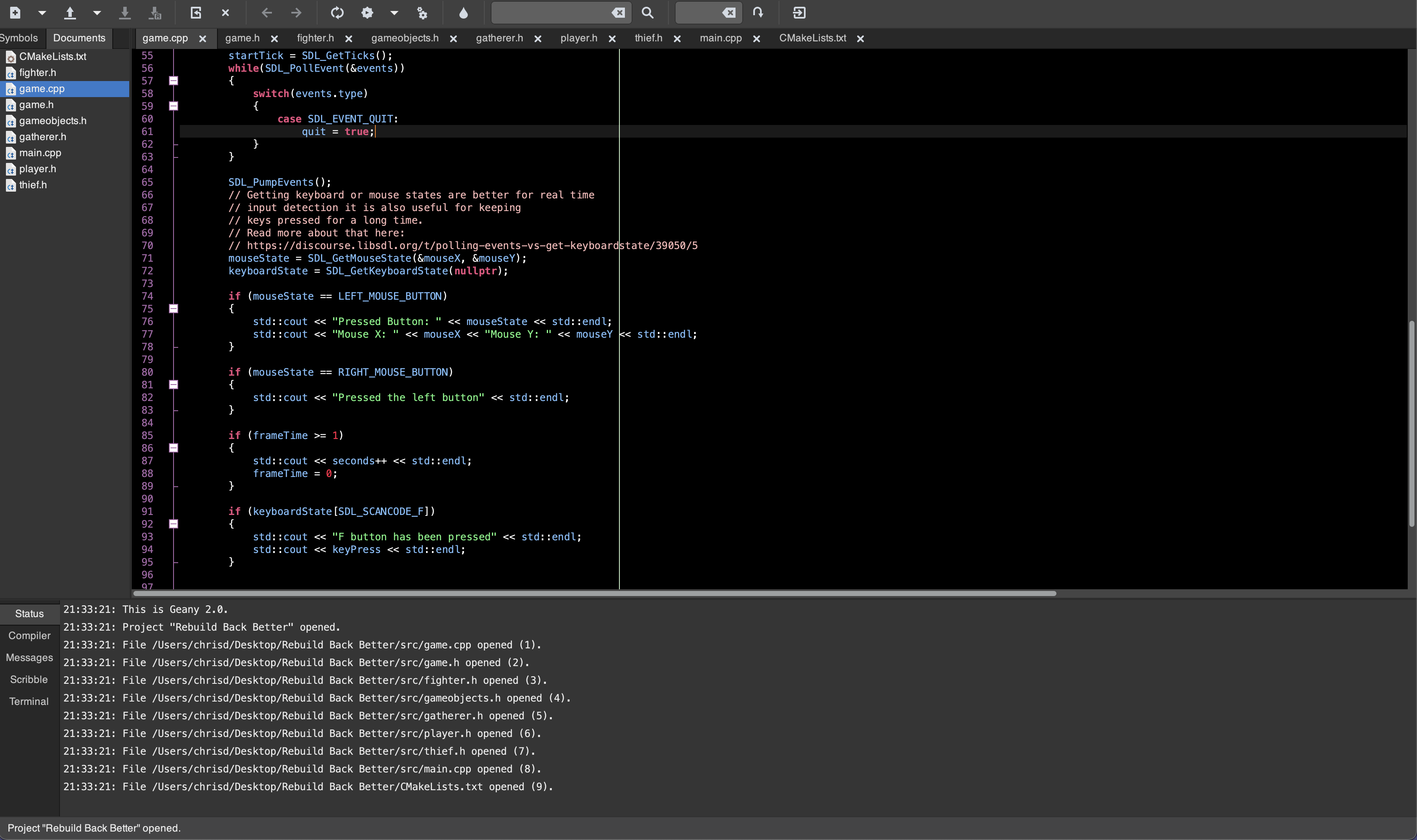
The first I did was to detect mouse button presses and the position of the mouse cursor. This is very important because the position of the mouse in the xy plane will be used to detect clicks for interactivity. The implementation is quite simple:
float mouseX, mouseY;
Uint32 mouseState;

// This part is inside the game loop
SDL_PumpEvents();
mouseState = SDL_GetMouseState(&mouseX, &mouseY);
if (mouseState == LEFT_MOUSE_BUTTON)
{
    std::cout << "Pressed Button: " << mouseState << std::endl;
    std::cout << "Mouse X: " << mouseX << "Mouse Y: " << mouseY << std::endl;
}

if (mouseState == RIGHT_MOUSE_BUTTON)
{
    std::cout << "Pressed the left button" << std::endl;
}
The conditional statements have been inserted for testing purposes.
Delta time
Delta time is extremely important in games as they are used to handle physics, animations, and movement. Delta time is the difference between the beginning and end of the game loop or the time between frames. To get the delta time in seconds, you will need to divide the difference by 1000.
static double startTick;
static double endTick;
static double frameTime;
static unsigned int seconds;

// Game Loop
startTick = SDL_GetTicks();
if (frameTime >= 1)
{
    std::cout << seconds++ << std::endl;
    frameTime = 0;
}

//Ending tick
endTick = SDL_GetTicks();
frameTime += (endTick - startTick)/1000;
What happens here is that every 1 second, the program outputs the current second.
Keyboard Input Detections
Since we are talking about games here, it is important to be able to get keyboard detections. It is important to note that SDL_PumpEvents() only needs to be executed once before getting mouse and keyboard states.
The function is used to update the event queue and internal input device state.
RUN THE FUNCTION ONLY ON THE MAIN THREAD
const Uint8 *keyboardState;

// Game Loop
SDL_PumpEvents();
Added Geany Project
I was looking for a lightweight and fast IDE and found Geany which has been nice. I do not need heavy-weight debugging tools and a rich-featured IDE. Everything works quite well so far!